
If people can find your website but cannot quickly call you, your business phone number is not doing its job. For a local service business, that number is often the shortest path from search to revenue. The goal is not to make it look nice in the header. The goal is to make it visible, clickable, trusted and trackable so more visitors become real calls.
Most small business owners already know they need a phone number on the website. The problem is usually where it appears, how it works on mobile, whether Google trusts it and whether anyone is measuring what happens after the phone rings.
Your business phone number should work like a lead source
A business phone number is not just contact information. It is a conversion point, especially for plumbers, HVAC companies, contractors, cleaning companies, driving schools, real estate pros and other local service providers.
Someone searching on Google is often deciding fast. If they have to hunt through your website to find a number, pinch the screen to tap it, wonder if you serve their area or wait for a slow page to load, you lose the call before you ever speak to them.
The best setup does three things:
- Makes calling obvious on every important page
- Builds enough trust before the call so the visitor feels comfortable
- Tracks where calls come from so you can improve what is working
This is where a lot of websites fall short. They may look modern, but the phone number is hidden in the footer, not clickable on mobile or inconsistent across Google, directories and the website.
| Phone number problem | What it does to leads | Better fix |
|---|---|---|
| Number only appears in the footer | Visitors miss it, especially on mobile | Put it in the header and near key calls to action |
| Number is not clickable | Mobile users have to copy and paste | Use a proper click-to-call link |
| Different numbers appear online | Google and customers may get confused | Keep your main local number consistent |
| No call tracking | You cannot tell which pages drive calls | Track calls by source without breaking local SEO |
| Missed calls go nowhere | Paid and organic traffic gets wasted | Add voicemail, follow-up and response rules |
Make your number obvious on mobile
Most local service leads do not start with someone calmly browsing your site on a desktop. They start with a person on a phone who wants a fast answer. Your business phone number needs to be easy to see and easy to tap.
For mobile visitors, the number should appear near the top of the page, not buried under a menu. A visible call button usually works better than a tiny phone number in a crowded header. If your website uses WordPress, this can often be fixed with cleaner header structure, a sticky mobile call button or better placement inside service pages.
The phone link should use a tel: format so the call opens directly on mobile. That sounds basic, but many small business websites still use plain text phone numbers that do nothing when tapped.
Speed matters before the call happens
If the page loads slowly, the phone number placement will not save it. Visitors often leave before the header finishes loading. This is especially common on older websites with oversized images, heavy plugins and cluttered design.
If speed is hurting your calls, start with the fixes that affect lead generation first. Sleek Web Designs has a practical breakdown of website speed fixes that matter for lead gen, including what to prioritize before spending time on minor technical details.
Keep your phone number consistent across local search
Your website is only one part of the call path. Google Business Profile, Apple Maps, Yelp, Bing Places, Facebook and local directories can all show your business phone number. If those listings do not match, it can create friction for customers and weaken trust signals for local SEO.
Name, address and phone number consistency is often called NAP consistency. It is not exciting, but it matters. A customer who sees one number on Google and another on your website may hesitate. Google also uses business information from multiple sources to understand local entities and locations.
Google’s own Business Profile guidelines say businesses should use a local phone number instead of a central call center number whenever possible. For a local service business, that usually means using a real number tied to your company and service area, not a random number that looks disconnected from your location.
If calls from Maps are a priority, your Google Business Profile should be clean before you start changing numbers everywhere. For a step-by-step view, use this Google Business Profile optimization checklist for more calls and make sure the basics are handled.
Match the number to the reason someone is calling
A visitor does not call just because a number exists. They call when the page gives them a clear reason to act.
That means the phone number should sit near context that answers the visitor’s main concern. A driving school visitor may want lesson availability, road test packages or instructor details. A homeowner with a leaking pipe wants emergency response, service area and proof that someone answers quickly. A nonprofit may need someone to explain a program or registration process.
This is why service pages usually drive better calls than generic contact pages. A strong page explains the service, who it is for, where it is available, what to expect and how to call. The number then feels like the natural next step.
Use call tracking without confusing Google
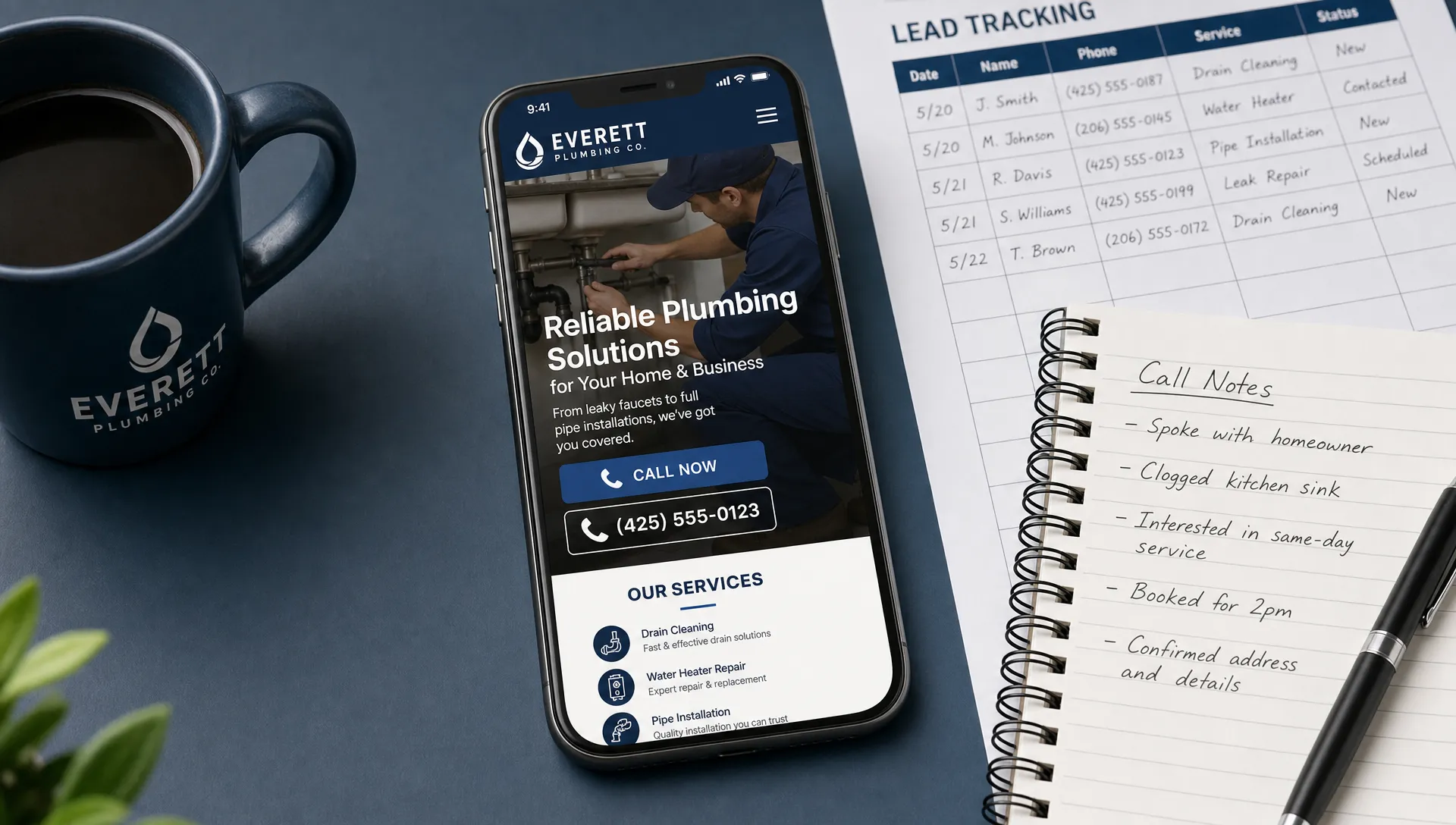
Call tracking can be useful, but it needs to be handled carefully. If every directory, landing page and profile shows a different number with no structure, you can create a messy local SEO footprint.
A simple approach works best for most small businesses. Keep one main local number as your core business phone number. Use tracking numbers where they help you measure campaigns, landing pages or specific sources, but do not scatter random numbers across the web without a plan.
| Tracking setup | Best use | Watch out for |
|---|---|---|
| Main local number only | Simple local SEO setup | Limited insight into lead sources |
| Tracking number on website | Measuring website calls | Keep local listings consistent |
| Tracking number on ads | Measuring paid campaigns | Do not use ad data to judge SEO performance |
| Dynamic number insertion | Advanced source tracking | Set it up carefully so Google still sees the correct number |
For many local businesses, the first goal is not advanced attribution. It is knowing whether calls come from Google Maps, service pages, organic search or referrals. Once you know that, you can invest in the channels that actually produce conversations.
If you record calls, check consent rules in your state and industry before turning anything on. Call tracking should help you improve service and marketing, not create privacy problems.
Fix what happens after someone calls
Getting more calls is only useful if those calls turn into booked jobs, appointments or qualified conversations. Many businesses focus on the website and ignore the handoff.
A good lead path includes fast answering, a clear voicemail, basic call notes and follow-up. If you miss calls during busy hours, lunch breaks or after-hours searches, your website may be generating leads that never become customers.
Use a simple call intake script
You do not need a complicated sales process. You need consistency. The person answering should know what to ask and how to move the caller forward.
A simple intake flow can include:
- What service are you calling about?
- What city or neighborhood are you in?
- Is this urgent or can it be scheduled?
- How did you find us?
- What is the best number for follow-up?
That last question matters. Sometimes the caller’s number is hidden, blocked or different from the best callback number. If you do not capture it, you may lose the lead.
Make voicemail work harder
A weak voicemail makes people hang up and call the next company. A better voicemail confirms they reached the right business, tells them what information to leave and sets an expectation for response time.
For example: “Thanks for calling. Please leave your name, phone number, service needed and city. We will call you back as soon as possible.” Keep it short. People calling from Google are not looking for a long message.
Use AI to find missed lead opportunities
AI does not need to be complicated to be useful. For a small business, the practical value is pattern finding. You can use AI to review call notes, form submissions, missed call logs and website pages to find gaps that are costing leads.
For example, if multiple callers ask whether you serve a certain town, that location may need clearer wording on your website. If callers keep asking about pricing, packages or availability, your page may be too vague. If many calls happen after hours, you may need better voicemail, scheduling options or clearer emergency instructions.
Before using AI tools with call data, remove private customer information unless you have a secure, approved workflow. You do not need to upload sensitive details to get useful marketing insights. Even a cleaned spreadsheet with call source, service type, location and outcome can reveal patterns.
A practical AI-assisted review can help answer questions like:
- Which services generate the most phone leads?
- Which pages get traffic but few calls?
- Which locations show demand but lack dedicated content?
- Which caller questions are not answered on the website?
This is the right way to use AI in local marketing. Not hype, not magic, just faster analysis of the information your business already has.
Put the phone number in the right place on each page
Not every page should use the phone number the same way. The placement should match the visitor’s intent.
| Page type | Best phone number placement | Why it works |
|---|---|---|
| Homepage | Header, hero section and footer | Helps new visitors call quickly |
| Service page | Near the service description and after trust signals | Connects the call to a specific need |
| Location page | Near service area details and local proof | Reassures visitors they are in your coverage area |
| Emergency page | Top of page and repeated after key sections | Supports urgent action |
| Contact page | Large clickable number with hours and backup options | Reduces confusion |
| Blog post | Near relevant call to action, not every paragraph | Turns helpful content into inquiries |
The goal is not to plaster your number everywhere. Too much repetition can make a page feel desperate. Place it where the visitor has enough information to act.
Avoid these common phone lead mistakes
Small issues can quietly reduce call volume. They are easy to miss because the website technically “has a phone number,” but the user experience is still weak.
Common mistakes include:
- Using a tiny number that is hard to tap on mobile
- Putting the number inside an image instead of real text
- Showing different numbers on the website and Google profile
- Sending all calls to a full voicemail box
- Using a national-looking number when customers expect a local business
- Hiding the phone number behind a contact form
- Forgetting to list business hours near the number
The worst mistake is assuming traffic equals leads. A website can get visitors and still fail if the call path is unclear.
A simple 30-day plan to get more calls
You do not need to rebuild everything at once. Start with the changes that have the clearest connection to phone leads.
| Timeframe | What to fix | What to measure |
|---|---|---|
| Days 1 to 3 | Check phone number consistency across website and Google Business Profile | Incorrect listings found and fixed |
| Days 4 to 7 | Add clickable phone links and improve mobile placement | Mobile call clicks |
| Week 2 | Improve top service pages with clearer calls to action | Calls by page or source |
| Week 3 | Review missed calls, voicemail and response process | Missed call rate and callbacks |
| Week 4 | Use call data to identify service or location content gaps | New page opportunities and lead quality |
This plan is simple on purpose. More tools will not help if the basics are broken. Fix visibility, trust and response first.
When the phone number problem is really a website problem
Sometimes the number is not the main issue. The real issue is that the website does not give people enough confidence to call.
If your site looks outdated, loads slowly, has thin service pages or does not explain why someone should choose you, moving the phone number will only help so much. This is when a website redesign may make sense, but only if it is focused on leads rather than decoration.
A lead-focused custom website should make the next step obvious. It should be mobile responsive, fast, clear and built around the services and locations that matter most to your business. For local companies, web design and local SEO should work together. A nice-looking site that does not rank or convert is not doing its job.
If you are comparing a Brooklyn web design partner or SEO agency, ask direct questions: How will this help us get more calls? How will local visibility improve? How will we know what is working? If the answers are vague, keep looking.
Frequently Asked Questions
Should I use my personal cell phone as my business phone number? It can work when you are just starting, but a dedicated business number is usually better. It looks more professional, makes tracking easier and keeps customer calls separate from personal calls.
Is a local phone number better than a toll-free number? For most local service businesses, yes. A local number can feel more relevant to nearby customers and aligns better with local search expectations. Toll-free numbers can still be useful for larger operations, but they are not always the best first choice for local leads.
Can changing my phone number hurt local SEO? It can create problems if the change is not handled carefully. Update your website, Google Business Profile and important directories so customers and search engines see consistent information.
How many times should my phone number appear on a page? Enough that visitors can call without searching, but not so much that the page feels cluttered. Header, footer and one or two strong call-to-action sections are usually enough for a standard service page.
Do I need call tracking to get more leads? No, but it helps you understand what is working. If you are not ready for tracking software, start by asking callers how they found you and recording the answer consistently.
Turn your phone number into a real lead channel
Your business phone number should not sit quietly in the footer while potential customers leave. It should be easy to find, simple to tap, consistent across Google and supported by a website that gives people a reason to call.
Sleek Web Designs helps small businesses improve websites, local SEO and lead generation without overcomplicating the process. We focus on calls, visibility and customer growth, not vanity metrics or long-term contracts.
If your website is not producing enough calls, contact Sleek Web Designs and let’s look at what is getting in the way.