When someone finds you on Google Maps, they make a decision fast. Before they read your reviews or click your website, they look at your photos.
If your Google Business Profile photos are dark, outdated, or generic, you are giving people a reason to keep scrolling to the next business.
This guide breaks down photo SEO for Google Business Profile in plain terms: what to upload, what to avoid, and how to build a photo library that actually drives calls.
What “photo SEO” means on a Google Business Profile
Let’s be clear: you are not “ranking” a photo the same way you rank a web page.
But photos influence the things that do matter:
- Clicks and calls (people trust businesses they can see)
- Engagement signals (more profile actions when the listing looks active and real)
- Conversion rate from Maps (a good profile gets the call before the website even loads)
Photos also help Google understand what you do and what customers should expect. Your category and services do most of the heavy lifting, but photos reinforce relevance.
Google’s basic photo guidelines (so your uploads don’t get filtered)
Google publishes its own requirements for Business Profile photos (format, size, quality). If you want the official rules, review Google’s photo guidelines for Business Profiles.
Here’s the practical version.
| Item |
Recommendation |
Why it matters |
| File type |
JPG or PNG |
Most reliable formats for GBP |
| File size |
Keep it reasonable (Google sets a minimum and maximum) |
Huge files fail or take too long to upload |
| Resolution |
Use clear, high-resolution images |
Blurry photos kill trust |
| Lighting |
Bright, natural light when possible |
Customers want to “see” the space and your work |
| Editing |
Light edits only (no heavy filters) |
Over-edited photos look fake |
If you do nothing else, do this: upload bright, sharp photos that clearly show your business and your work.

The photo mix that generates leads (what to upload)
Most businesses upload random pictures and hope it helps. A better approach is to upload photos that answer the real questions customers have:
- “Is this place legit?”
- “Do they actually do this work?”
- “Will they show up and do a clean job?”
- “Are they close to me?”
Below is a simple upload plan that works for local service businesses.
1) Logo (don’t overthink it)
Upload a clean, square logo. No phone screenshots. No tiny text.
This helps with brand recognition, especially when customers compare multiple listings.
2) Cover photo (your “first impression”)
Your cover photo should instantly communicate:
- what you do
- what your business looks like in real life
- professionalism
Good cover photo options:
- branded team photo outside your location
- your best “at work” photo (clean, well-lit)
- exterior shot with clear signage
Avoid: stock images, generic city skylines, or a close-up of a tool that could be anyone.
3) Exterior photos (prove you exist and help people find you)
If customers visit you, exterior photos matter a lot. Even if you are mostly on-site (HVAC, plumbing, cleaning), exterior photos still build legitimacy.
Upload:
- front entrance from the street
- signage close-up (readable)
- parking or “what to look for” angle
- day and night shot if you serve evenings
4) Interior photos (set expectations and reduce friction)
Interior photos answer: “What am I walking into?”
Upload:
- reception or waiting area
- work area (clean, organized)
- any customer-facing space
If you do not have a public office, skip this. Do not fake it.
5) Team photos (trust sells)
Local services are personal. People want to know who is showing up.
Upload:
- 1 clean team photo
- 2 to 5 individual shots (owner, lead tech, instructors)
Keep it real. Clean background, good lighting, branded shirt if you have one.
6) “At work” photos (these are your best lead generators)
These photos do the heavy lifting because they show proof.
Upload:
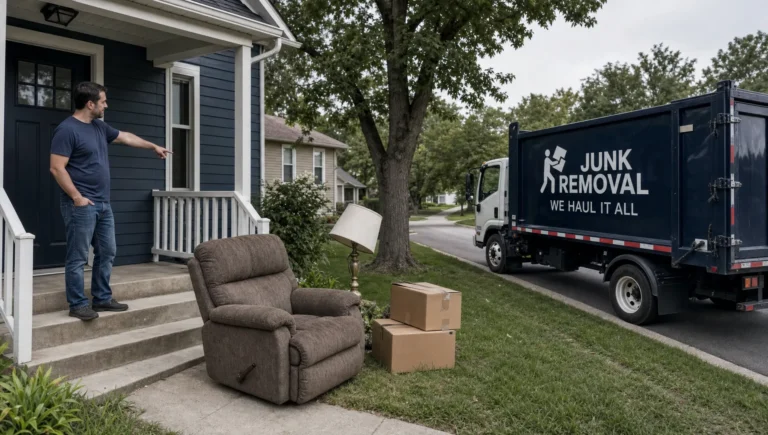
- technicians performing the service
- a clean “before and after” (same angle, same room if possible)
- the finished result (clean install, repaired unit, cleaned space)
For driving schools, this category is gold:
- instructor with student at the vehicle (parked, safe setting)
- interior dashboard angle (no personal info visible)
- cones setup for practice
- “first lesson” style photos
7) Equipment, vehicles, and branded assets (supporting proof)
These photos are not exciting, but they build credibility fast.
Upload:
- branded van/truck (clean)
- tools laid out neatly (not messy garage floor photos)
- uniforms, badges, certificates (only if legitimate)
8) Job site context (show the types of homes/buildings you serve)
Customers want to know if you serve places like theirs.
Upload a mix:
- residential job site
- commercial job site (if you do both)
- common building types in your area (brownstones, condos, small storefronts)
Do not reveal customer addresses or anything sensitive.
9) Products or production (only when it’s real and relevant)
Even service businesses have “product-like” proof: materials, parts, finished installs, completed projects.
If you are in a field where process matters (manufacturing, trades, build-outs), behind-the-scenes photos can be a strong trust signal. For example, apparel businesses often show development and production steps so buyers know there is real capability behind the brand, like the factory and sampling visuals showcased by Arcus Apparel Group.
The takeaway: show the work, not a stock image of the work.
What to upload first (a simple starter set)
If your profile is thin, aim to upload a complete starter set in one week so your listing doesn’t look “empty.”
A solid baseline for most local businesses:
- 1 logo
- 1 cover photo
- 3 to 6 exterior photos (if applicable)
- 3 to 6 interior photos (if applicable)
- 5 to 10 team and “at work” photos
- 5 to 10 proof photos (before/after, equipment, finished jobs)
You do not need 200 photos to start. You need the right photos.
Photo ideas by business type (quick reference)
| Business type |
Photos that drive calls |
Examples |
| HVAC / plumbing / electrical |
On-site work + clean results |
tech working, clean install, before/after |
| Cleaning service |
Before/after + team |
bathroom/kitchen results, crew photo |
| Contractor / home services |
Project progress + finished shots |
framed-out stage, finished room, details |
| Driving school |
Training proof + trust |
instructor/student, vehicles, practice setup |
| Nonprofit / community org |
People + mission in action |
events, volunteers, space, services delivered |
Photo SEO checklist (how to make each photo pull its weight)
You do not need a photographer. You need consistency.
Use this checklist before uploading:
- Take photos in good light. Stand near windows or shoot outside when possible.
- Clean the scene. A messy background makes your business look disorganized.
- Show branding when you can. Shirt logo, van wrap, signage.
- Use real photos, not stock. Stock photos reduce trust and can confuse customers.
- Avoid heavy text overlays. A little is fine on marketing graphics, but photos should look natural.
- Do not upload screenshots. Menus, quotes, or flyers should be Posts or website content, not your main photo gallery.
- Keep it current. If your space, staff, or vehicles changed, update photos.
How often should you upload photos?
A profile with fresh photos looks active, and active listings usually convert better.
A simple routine most small businesses can keep up with:
- Weekly: 1 to 3 new “at work” photos
- Monthly: 1 team or behind-the-scenes photo
- Quarterly: refresh cover photo and remove outdated images
If you are too busy for weekly, do bi-weekly. Consistency beats perfection.
Common photo mistakes that cost you leads
Uploading only “pretty” photos, not proof photos
A nice office photo is fine, but it does not answer, “Can they solve my problem?”
If you want more calls, prioritize:
- work being performed
- finished results
- the people doing the work
Letting customers control the story
Customers can upload photos to your listing. Some are great. Some are blurry, wrong, or even from another business.
You cannot stop user uploads, but you can:
- upload enough strong owner photos so your gallery is not dominated by random images
- flag inappropriate or inaccurate photos in your profile
Posting outdated photos
Old hours signage, old vehicles, or an old team photo creates doubt.
Doubt kills calls.
Uploading low-quality “noise”
Ten bad photos are worse than five strong ones.
If it is blurry, dark, tilted, or confusing, skip it.
Using AI to improve your GBP photos (without the hype)
AI can help with photo SEO in practical ways, not magic ways.
Here are useful applications:
- Auto-pick the best photos (sharpness, lighting, clarity)
- Batch crop and resize so images look consistent
- Spot privacy issues (faces of customers, license plates, addresses)
- Create a shot list based on what competitors are showing and what you are missing
At Sleek Web Designs, we use AI-assisted analysis to find gaps fast, then we fix the basics that drive leads: clarity, relevance, and a profile that looks like it belongs in the top results.
If you want the bigger checklist beyond photos, this pairs well with our guide on Google Business Profile optimization for more calls and our breakdown of Google Maps optimization.
Frequently Asked Questions
Do photos help Google Business Profile rankings? Photos are not the only ranking factor, but they can improve engagement and conversions, and that helps you win more calls from the visibility you already have.
How many photos should I have on my Google Business Profile? There is no perfect number. Start with a complete set (logo, cover, proof, team, work photos), then add 1 to 3 new photos per week or every other week.
Should I use stock photos on my Google Business Profile? No. Stock photos reduce trust and often look generic. Real photos of your team and your work convert better.
What types of photos get the most calls? “At work” photos, clear before/after shots, team photos, and anything that proves you do the job professionally.
Can I remove bad customer photos from my listing? You can report photos that are irrelevant, inappropriate, or violate Google’s policies. You cannot remove every unflattering photo, so the best defense is uploading strong owner photos consistently.
Do I need professional photography? Not necessarily. A modern phone, good lighting, and a simple shot list are enough for most local service businesses.
Want your Google Business Profile to generate more calls?
If your profile is getting views but not calls, the issue is usually simple: the listing is incomplete, unconvincing, or both.
Sleek Web Designs helps small businesses turn their Google Business Profile into a lead-generating system using local SEO, website optimization, and AI-assisted audits that focus on outcomes (calls, form fills, booked jobs). No long-term contracts.
If you want us to review your profile photos, categories, and conversion setup, reach out through Sleek Web Designs and ask for a Google Business Profile audit.