
Most service business websites already have a “meta description.” The problem is it’s usually an afterthought, generic, or copied sitewide. That one small block of text can be the difference between a qualified lead clicking your listing, or calling the company above you.
A good meta description is not about sounding clever. It’s about making the right person think, “Yes, that’s exactly what I need,” and click.
What a meta description actually does (and what it doesn’t)
A meta description is the short snippet that often shows under your page title in Google results.
Here’s the part most business owners miss:
- Meta descriptions are mainly a click decision tool, not a ranking “hack.”
- Google can rewrite your meta description if it thinks another snippet from your page matches the search better.
Google explains this behavior in its documentation on how snippets are created.
So your goal is simple: write a meta description that matches real search intent, matches your on-page content, and makes the click feel like the obvious next step.
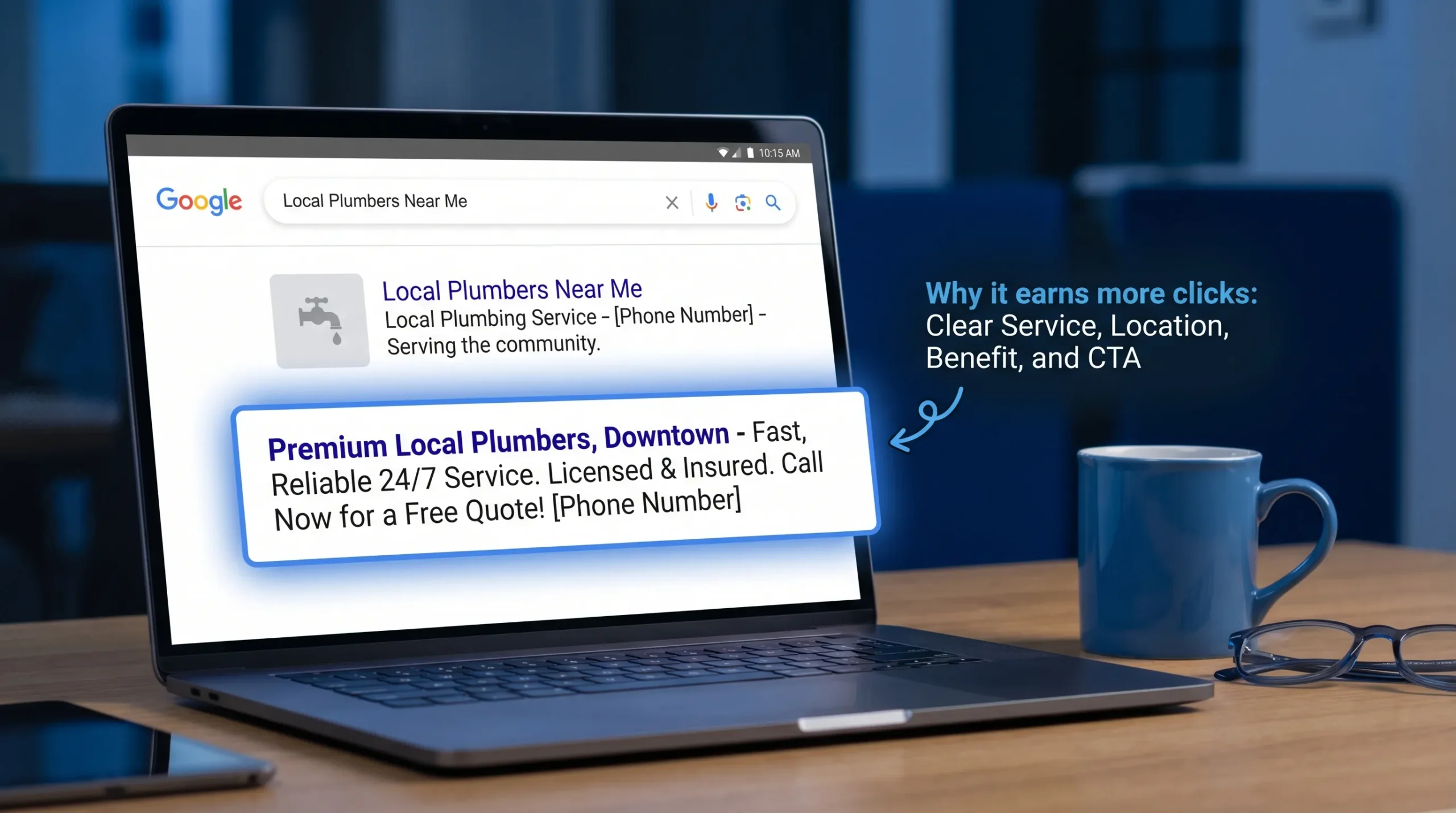
Why meta descriptions matter more for service businesses
If you sell a local service, most of your traffic is not browsing for fun. They’re trying to solve a problem fast.
That means your meta description should answer the questions people silently ask in the search results:
- Do you offer the exact service I need?
- Do you serve my area?
- Can I trust you?
- What happens if I click, can I call, book, or get a quote quickly?
This is also where many websites accidentally lose leads. They rank, but the snippet is so bland that the click goes to a competitor.
The “4-part” meta description formula that earns clicks
For most local service pages, this structure works because it mirrors how people choose:
Service + Location + Proof/Outcome + Next step
Examples (you can adapt these to any trade):
- Plumber (Brooklyn): “Need a plumber in Brooklyn? Same-day repairs for leaks, clogs, and water heaters. Upfront pricing. Call now for availability.”
- HVAC (Queens): “AC not cooling? Get fast HVAC repair in Queens, NY with clear pricing and reliable scheduling. Book service today.”
- Driving school: “Driving lessons in Brooklyn for beginners and anxious drivers. Flexible scheduling and road test prep. Request your first lesson.”
Keep it human. No fluff. If you can’t say it on the phone to a customer, don’t say it in your snippet.
How long should a meta description be?
There isn’t one perfect character limit because Google displays snippets by pixel width and device. In practice:
- Aim for about 120 to 160 characters.
- Put the most important info in the first 120 characters.
If your main point is at the end, it’s the first thing to get cut.
Meta description templates for your most important page types
Most service websites only need great meta descriptions on a handful of pages to see a difference: homepage, core service pages, and top location pages.
Use the table below as a starting point, then tailor it to what you actually do and where you actually work.
| Page type | What the searcher wants | What your meta description should say | Example you can model |
|---|---|---|---|
| Homepage | “Is this company legit, and do they serve me?” | Core services, service area, trust cue, how to contact | “Local HVAC company serving Brooklyn and Queens. Fast repairs, clear scheduling, and real support. Call now or request service online.” |
| Service page (single service) | “Can you solve this specific issue?” | Specific problem, outcome, turnaround, CTA | “Water heater repair in Brooklyn, fast diagnosis and reliable fixes. Get pricing and schedule service today.” |
| Service + city page | “Do you do this service in my neighborhood?” | Service + city match, proof, CTA | “Need drain cleaning in Park Slope? Quick appointments and professional service. Call for same-day availability.” |
| Contact/booking page | “How do I reach you now?” | Contact method, hours (if true), urgency-friendly CTA | “Call or request an appointment online. Get a quick response and schedule service without back-and-forth.” |
| Review/testimonial page | “Can I trust you?” | Social proof angle, what clients praise, CTA | “See what local customers say about our plumbing repairs, response times, and pricing. Read reviews, then request a quote.” |
Two important rules:
- Don’t promise “24/7” or “same-day” unless it’s consistently true.
- Make sure the page actually supports what the snippet claims (Google rewrites when it doesn’t).
A quick way to beat competitors without changing your rankings
If you’re already on page one, improving your snippet is one of the fastest ways to pull more leads from the same position.
Here’s how to do it in plain English:
Step 1: Search your main service in your main area
Example searches:
- “boiler repair Brooklyn”
- “driving lessons near me”
- “roof leak repair [your town]”
Open the top 5 results (not ads) and look for patterns:
- Who sounds specific?
- Who sounds trustworthy?
- Who tells you what to do next?
Step 2: Write a description that answers what theirs avoids
If competitors say “We offer quality service at great prices,” you can win with specificity:
- “Same-week appointments” (only if true)
- “Licensed and insured” (only if true)
- “Specialists in X problem”
- “Request a quote” or “Call now”
Step 3: Make sure your title tag and meta description agree
If your title says “Emergency Plumber,” but your meta description talks about remodels, that mismatch drops clicks.
If you want a refresher on titles, this pairs well with our guide: What Are Title Tags and How to Write Them for SEO.
Mistakes that kill clicks (even when you rank)
Most low-performing meta descriptions fail for predictable reasons:
They’re generic
Bad: “We provide the best service. Contact us today.”
That describes everyone, so it convinces no one.
They stuff keywords
Bad: “Brooklyn plumber, plumbing Brooklyn, plumber near me, plumbing services Brooklyn…”
It reads spammy, and users skip it.
They don’t include location when location matters
If you serve specific areas, say it. People want confirmation they’re not wasting a click.
They don’t have a next step
A meta description is “free ad copy.” If you don’t tell people what to do, they pick another listing that does.
They’re duplicated across the site
If every page says the same thing, Google has nothing useful to show, and it often rewrites your snippet anyway.
Using AI to write meta descriptions (without sounding like AI)
AI can help you produce options quickly, but you still need a human editor who understands your customers.
A practical way to use AI:
- Generate 5 to 10 variations for one page.
- Pick the one that sounds most like how you speak to a real caller.
- Remove empty phrases like “top-notch,” “cutting-edge,” “premier,” and “world-class.”
- Verify every claim.
If you want a real-world example of how a professional service brand communicates credibility, look at a practice like the Henlin Gibson Henlin law firm. The site is clear about what they do, who they are, and how to contact them. Your snippets should feel the same way: specific, confident, and easy to act on.
How to measure if your meta descriptions are working
You don’t need fancy tools. Use Google Search Console.
In Search Console, check:
- Performance: Look at clicks, impressions, and CTR.
- Pages: Find service pages with high impressions but low CTR.
- Queries: See what people actually typed when your page showed up.
Then update the meta description to match the highest-intent queries you’re already appearing for.
A simple testing approach:
- Change meta descriptions on 3 to 5 high-impression pages.
- Wait 2 to 4 weeks.
- Compare CTR before and after.
If you want more conversions once they land on your site, the snippet is only step one. The above-the-fold experience matters next. This guide can help: Above-the-Fold Fixes That Increase Form Submissions.
Quick checklist before you publish
Use this to sanity-check any meta description in 30 seconds:
- Does it say the service clearly?
- Does it mention the location (when relevant)?
- Does it include a trust cue that’s actually true?
- Does it tell the searcher what to do next?
- Does it match what’s on the page?
If you can answer “yes” across the board, you’re ahead of most local competitors.
Frequently Asked Questions
Do meta descriptions help SEO rankings? Meta descriptions don’t directly boost rankings, but they can increase clicks. More clicks from the right searches can help your pages earn more traffic from the rankings you already have.
Why does Google show a different meta description than the one I wrote? Google may rewrite snippets if it thinks another part of your page better matches the search query. This is common when your description is too generic, doesn’t match the page content, or doesn’t match the query intent.
Should every page have a unique meta description? Yes, for your main pages. Unique descriptions help Google and searchers understand what’s different about each page, especially service pages and location pages.
Is it okay to use “Call now” in a meta description? Yes, if calls are the primary conversion for your business. Just keep it natural and make sure the page makes it easy to call on mobile.
What should I do if my CTR is low but I rank on page one? Start by rewriting the title tag and meta description to better match the exact queries you’re showing up for, then make sure the page content delivers what the snippet promises.
Want us to write and test these for your site?
If your site ranks but doesn’t bring in enough calls, your meta descriptions are a quick win, but only when they match your services, your locations, and your actual offer.
Sleek Web Designs helps service businesses turn websites into lead-generating systems through website optimization, local SEO, and practical AI-assisted analysis. No long-term contracts.
If you want more clicks from your existing rankings and more leads from the traffic you already have, start with a focused audit and a short list of high-impact fixes. Visit Sleek Web Designs to get started.